How-to Blog
Origin Story
This app was made across about two months and had a handful of different epochs which had wildly
different focuses, techniques, and approaches. It all started when I decided to revisit learning to
code; something I’ve intermittently picked up for a few months at a time over the years. I’d typically
make some progress, then get bored, then move on to a new hobby. It never quite stuck.
This time, I decided to approach it by watching a tutorial a few times, including watching it listening
to it, copying it step-by-step as I watched. After the third or fourth go-around, it occurred to me that
I could actually commission a bespoke tutorial by engineering a prompt for ChatGPT.
I told it something along the lines of:

…and it worked extremely well. I got few dozen steps in, to about step 50. At that point, its responses were so lengthy and intricate that it was typing out basically an entire app. Granted, it was quite clunky and unattractive, but separately from the tutorial it was pretty stunning how much functioning code it was putting together.
I decided to pivot from my tutorial altogether, and just see what this thing could do. I asked it, little by little, to create a game. Unfortunately, I didn’t document everything verbatim, but it was very incremental. First I asked for a basic HTML framework. Second I asked for a basic <canvas>, then a ‘rocket’ (which even to now is just a basic triangle). Then I incremented little by little. I went to a basic color palette generator (as a colorblind person, so maybe it’s not ideal). I slowly added behaviors, little by little.
Producing the game itself took approximately 250 prompts with AI; back and forth, iterating, refining, adding new features, etc. It’s really a remarkable technology and I can’t wait to see where it leads.
It also led me to a lower and lower level of dread over the AI hype and fear mongering. Yes a large company can replace a swathe of staff, but private individuals can too. Think; I was able to do the work of a much more qualified coder than I truly am. This can scale across a ton of areas of expertise. Certainly not to the extent of a medical doctor, but at least to the extent that little old me could get a game going in a relatively short span of time after beginning a mere tutorial.
I would advise anyone do a tutorial as I mentioned above, in any language you want to learn, just so you know the basics. There’ve been a few times where I prompted 10+ times to AI, made no progress, then decided to do something manually and resolved it in a very short time. So, it isn’t perfect, and knowing a thing or two is necessary, but it’s still pretty remarkable.
A Lot to Learn
For me, the most important thing to learn when prompting AI has been to focus on the prompt itself.
I’ve
made way more progress with thoughtful prompt engineering than I have with “Think longer” or any
equivalent.
Because of how much of a genie in a bottle AI can be, what defines a truly good prompt really
varies,
and you’ll certainly learn as you go along.
What’s been most key for a good prompt is patience and a singular goal. Don’t prompt by asking,
‘give me
a website with X functionality, Y functionality, Z functionality, where X interacts with Z in
behaviors
1, 2, and 3 depending on user inputs [1-thru-100], or anything along those lines. What you’ll get
(with
current AI as of October 2025) is maybe the basic skeleton of what you asked for, but everything
will be
haphazardly linked and probably will outright not function in numerous different ways. These issues
will
then bog you down and you’ll spend the whole day unwinding the issue.
The best way to approach it is to just embrace that it’ll, depending on complexity, likely take
hundreds
or thousands of little tiny prompts to get where you’re going. These tiny steps are also why it’s
good
to know a little bit about coding; you need to know what languages are even capable of; what
languages
handle given responsibilities, why you might just need JavaScript for some things (like OrbitTimer’s
game), or why you might need SQL, or various APIs.
This segues into one of the most important types of prompts, which is simply asking what the best
way to
do something will be. I’ve had a number of issues in the past where I thought I knew what the right
approach would be, then got an hour (or more!) into trying to resolve an issue, all to later have AI
tell me something along the lines of, ‘because you’re doing it this way and not [previously unstated
other, much better and quicker way], it’s going to take much longer’.
So, knowing the capabilities, strength, and weaknesses of languages, apps, etc, is incredibly
critical.
I’d suggest spending a week or two doing AI prompt-driven tutorials as I noted in the article above,
or
at least listening to some 101’s on YouTube. That week or two will save you dozens of prompts later,
dozens of dead-ends prevented, and generally improved decision-making. You don’t want to spend hours
or
days on an issue only to find later that there was a much quicker way of doing something.
Original Technique & Mistakes Made
When I first started OrbitTimer, my technique was just way off. I spent (to get to v1.0) probably
90-to-100 prompts getting the game to a publishable state. And, we’ll never know for sure, but
likely 50
of those prompts were wasted by coming up with a prompt, entering it, then receiving incredibly
buggy
code. When this happens, you can easily get 5-10 prompts into the resolution phase before actually
resolving it. On an unpublished app, the longest I’ve gone without resolving a bug was something
like
120 prompts. It can feel like the slog-est of slogs that ever slogged. It can feel like the task is
totally impossible.
So, what helps prevent getting to dozens of prompts over the same issue, is to (1) subdivide a
problem
as granularly as possible and (2) save each successful iteration as their own version. This is
incredibly important. What can happen very easily if you don’t do that, is you can request the
addition
of Feature A. Then Feature A gets added. Then you request Feature B, and Feature B gets added. Then
you
request Feature C, and Feature C is super glitchy, then you spend some prompts untangling the
glitch,
but each time you prompt, you receive a resolution to the issue in Feature C, but the returned code
includes the destruction of Feature A. Then, you have to chase the issue with Feature A, and maybe
after
some prompts Feature A is resolved, but then an issue with Feature B pops up.
The resolution to this is simple. Each time you add a feature, save that code as its own version in
your
development environment. For example, start with Code_v1.html, request Feature A. Feature A gets
added,
then save that code, copy-paste into Code_v2.html. Request Feature B, and when it’s added, iterate
forward to Code_v3.html. For every published version online, I have anywhere from 5 to 30 offline
versions. For example, OrbitTimer is on v1.6 publicly (as of writing), but privately and offline,
I’m on
v66.
Online, I have v1.0-to-1.6, and I’ve iterated in units of 0.1, which means each online version had
around 10 offline versions.
In my experience, you should really only prompt multiple times per offline version if the exact
request
you made wasn’t met. If it starts creating other issues, you can always go back to the code in the
latest un-glitchy version.
Last thing I’ll say here is that, amidst all the offline versions, you’ll likely have a large
majority
which aren’t necessarily publishable, likely due to simple incompleteness, but sometimes a glitch
will
be merely partially resolved, so sometimes they won’t be publishable due to outright dysfunction. To
avoid getting lost in which offline versions are actually publishable, make sure to save publishable
versions as such. If v1-to-17 aren’t publishable but v18 is, save v18 as, “Code_v18_P.html”, or
“Code_v18_Publishable.html”.
That way, you can iterate sequentially, v1-to-[infinite]. Then, when you’re testing actual stages of
completeness, you can see publishable (“_P”) iterations more easily, and you’ll save a lot of time
sifting through what were actually complete at their given stage and what weren’t. You don’t want to
be
publishable at v43, then again at v57, then forget what your most recent publishable version was and
have to play a guessing game of a bunch of different versions, especially if (1) the underlying
issue
takes multiple steps within the app to actually get to and/or (2) the app is a game and the glitch
being
resolved takes 15 minutes of play to actually get to and even be able to test.
Evolved Technique & Version Iteration
As stated above, you can easily get to a point in development where you’re seeing a glitch that is
only
accessible by getting to a stage in the app’s usage that takes 15 minutes to get to. Even if it’s
only 3
minutes, if you’re prompting to resolve a glitch, you can easily stack the 2-3 minutes with 3
minutes of
prompting, and get to over an hour of back-and-forth interaction. Thus, what you need to do is
prompt to
request a developer mode. The developer mode can function in a bunch of different ways. For
OrbitTimer,
there’s a store. The store has items which get quite expensive, and getting to those options via
play
can take 10+ minutes. If you’re trying to test the performance and functionality of the most
expensive
item in the store, you can easily spend inordinate development time just playing the game itself.
Not
that the game isn’t fun, it just is that constantly playing it for the sake of engineering certain
circumstances is a giant time-sink.
For the store, I requested that currency logic was deactivated; that in the developer mode I could
toggle each store item on/off by simply clicking it. It’s super simple stuff like this, where I
reduced
10 minutes of play-for-testing, down to literally just 1 second, where you can turn an 8 hour day
into a
45 minute day.
These techniques are invaluable and will save you tons of time. If I knew the version iterations
method
I outlined above, it wouldn’t have taken me 2 weeks to make the app. It likely could’ve been done in
5
days, max, and those days would’ve been infinitely less frustrating.
Online vs Offline Versions
When I was originally doing this, my first 100 prompts were almost nerve-wracking, because I knew I
was
always one imperfect prompt/error away from a huge setback. The reason why is simply because I
didn’t
have anything to fall back on, I wasn’t doing the iterate-and-save approach at all. So, I’d get
dozens
of prompts in, dozens of changes, features added, glitches resolved, and so forth. Because of that,
I
was extremely conservative.
My original posting of OrbitTimer, v1.0, was (in hindsight) probably more like a v0.1. There were
issues
I was afraid to address because each prompt has the chance of creating new issues, or reintroducing
old
ones. So, the game just was terrible. It didn’t have a store, pause/play, levels, or currency logic
at
all. The frame rate for side-to-side movement was bad. It had one goofy feature, which was that the
fuel
was contingent on a stopwatch widget (not necessary, just was an experiment), and fuel would iterate
upwards for every second the stopwatch incremented, then the game would become playable. That was
the
only even remotely interesting aspect of it, and even then it wasn’t ‘fun’, it was just an unrelated
experimental thing.
There were also a bunch of glitches; the restart button didn’t work, the game would end upon descent
starting about 50% of the time, and altogether it was just a weak production.
I believe others have had similar issues, as seen in this
similar article by someone named Mark Rodseth. It's a great article because it reveals that
others have had similar problems, although I personally use a different approach leaning towards a
high amount of prompts.
The reason I’m saying this is because locking down and iterating versions every time something you
prompt for is returned allows you to be free from any threat of a bug or glitch. Each prompt doesn’t
feel like a risk, or like it’ll undo previous hours of iterating. It allows you to take huge risks,
and
maybe even get slightly lazy. It goes from feeling like some kind of litigious nightmare to
something
that’s fun. It even feels productive, because you can look at your folder and see dozens of versions
of
something, and visualize your progress more easily.
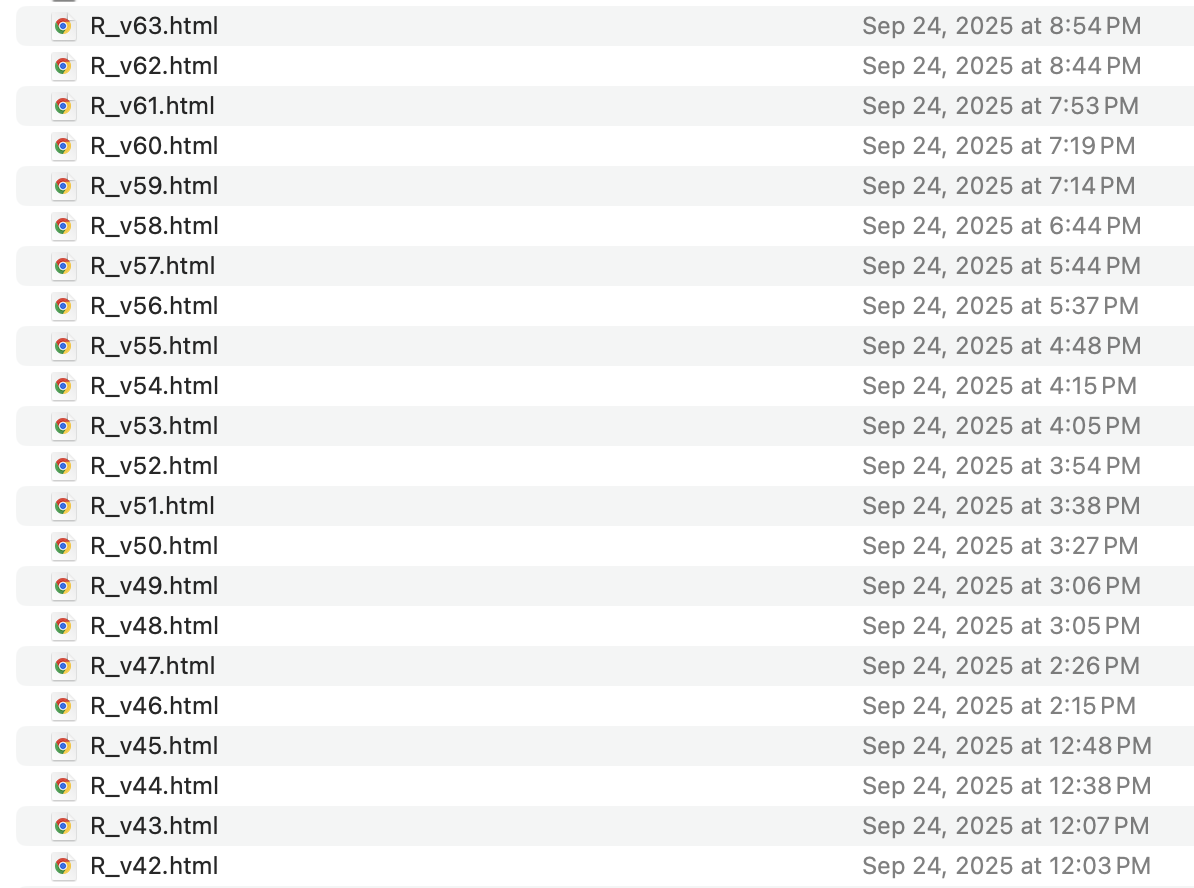
Interestingly, the first 100 prompts had one single backend version, but the next 150 had 65. As an
example, below is a screenshot of an epoch of saves:
Troubleshooting & Console Logging
This is one of those things where actually knowing how to code will give you a huge advantage. For
those
who don’t know, each coding language has a way of logging targeted information in the console for
the
developer, in the dev environment, to be able to see what’s working and what isn’t. You also
generally
see console logging used in initial/101-style tutorials. The classic first-ever-code snippet, “Hello
world” is generally done via the respective language’s console log syntax, but console logs have
very
critical real-world uses which can also save tons of prompts in AI environments.
For example, let’s say you have a glider game where you need to fly over some obstacle. You want the
glider to stop/crash if it hits said obstacle. For some reason though, there’s a glitch where the
glider
stops midair within a second of flying through the obstacle successfully.
You should enter a prompt, requesting console log for the moment-by-moment sequence of flying near
the
obstacle, so you can tell where exactly the glitch is happening. You might say, “I have an issue
with
traversing through the obstacle. Give me a console log for speed, time, X/Y position, and any
noteworthy
data, for each second user approaches, goes through, and passes beyond the obstacle.” Another
measure
instead of time would be a range of pixels from before, during, and after the obstacle. In general,
it’s
critical to know the scale and terminology of what you’re using to ensure prompts are as specific as
possible. If you’re altering something within a <canvas>, knowing the pixel dimensions of said
canvas will be important for specifying where and when an issue occurs. Your requested logs should
include that kind of data.
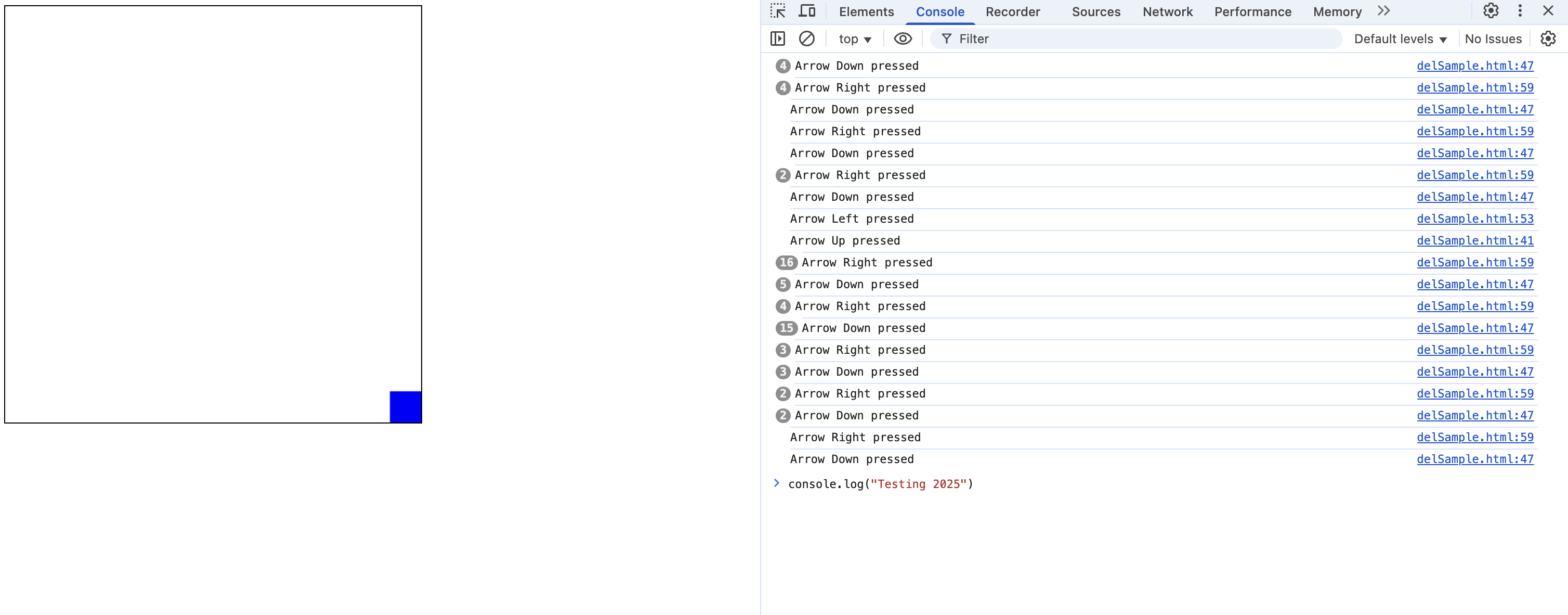
Then, assuming the prompt is successful, you’ll see in the console (can be found in Chrome Dev Tools
[upper bar: View -> Developer -> Developer Tools -> ‘Console’ tab], the given data for each
second.
Sometimes it isn’t granular enough. Sometimes you’ll see nothing in the logs, and often times asking
for
a finer interval, e.g; asking for a console log every 0.05 seconds, or something like that. Then,
what
I’ve done is literally just copy-paste all logs from Chrome Dev Tools’ UI within my prompt, and say
something along the lines of:
“The glitch persists. I [can/can’t] find the issue, but here are the logs:”
Oftentimes that will expedite the resolution of the glitch(es). It’s easy to get lazy and think that
each prompt needs to yield a surface-level behavior or functionality, but you’ll find that efficient
prompting often includes backend, dev-only prompting. I’ve copy-pasted dozens of lines of logs and
fixed
persistent issues within <5 log-centric prompts.
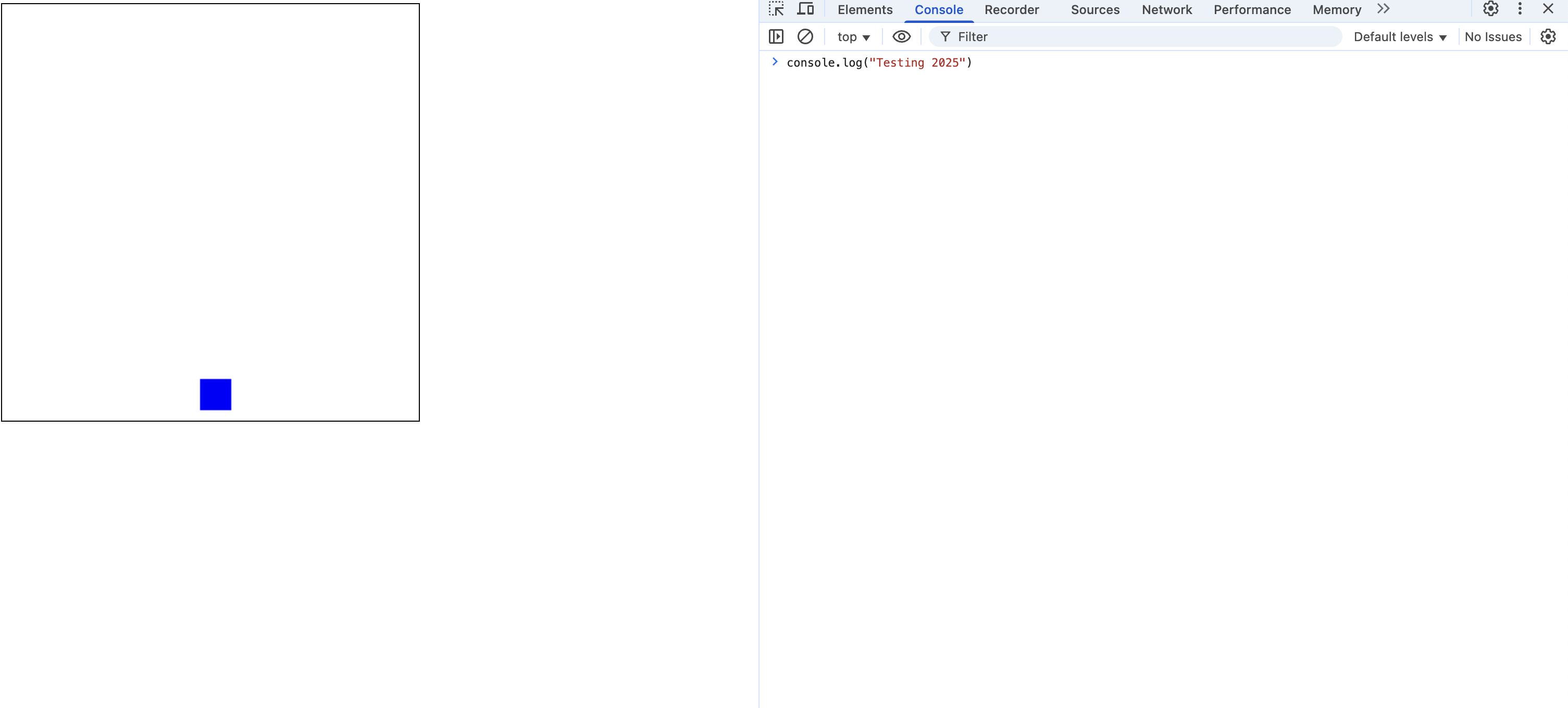
Below is a screenshot of a hyper-basic 'app', just for example purposes. The app is simply a blank
canvas wherein the user can move the blue square with the arrow keys. However, there's no logging of
specific events other than the initial rendering of the page. In reality, this is straightforward,
but
sometimes app behaviors can be ambiguous and hard to pinpoint.
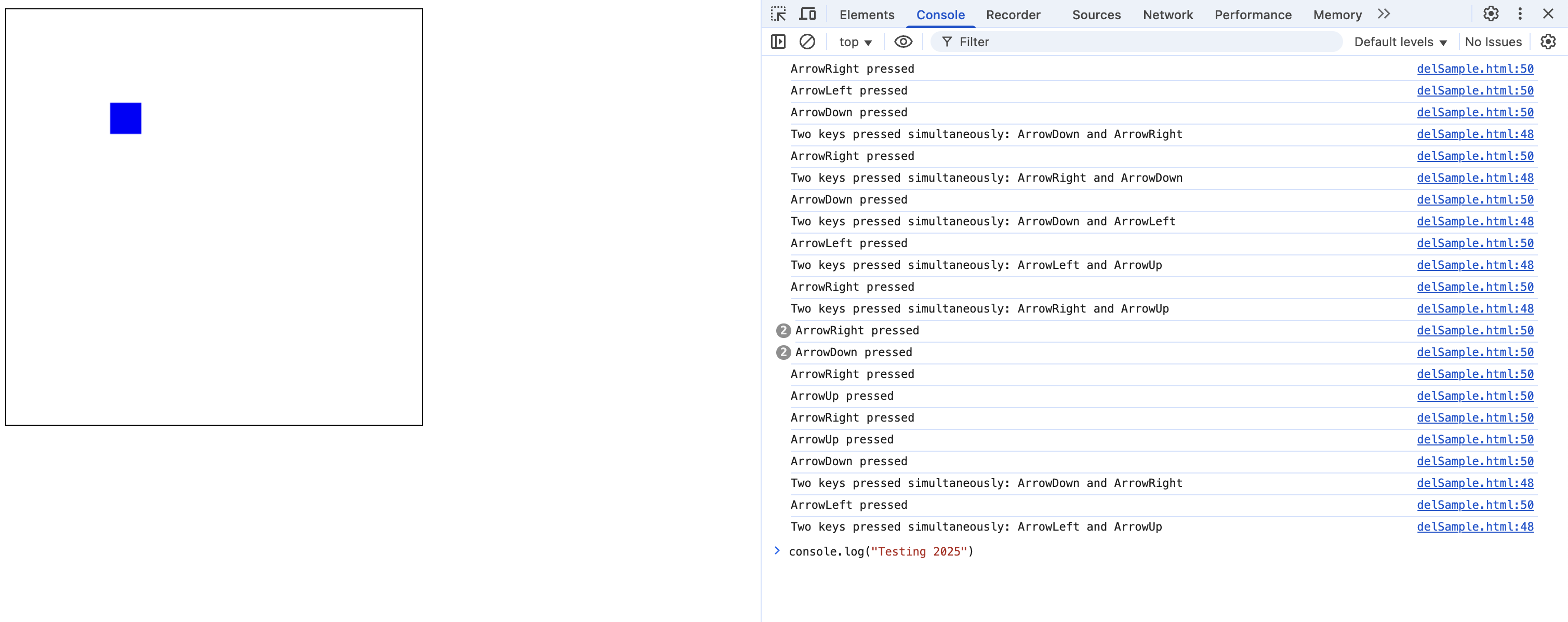
You can even request more detailed logs, like specific events. Below's screenshot is from after requesting logs for the specific instance of 2 simultaneous button presses:
I haven’t used Gemini extensively, but you can tell it’s by a super-scale, very mature company that probably has seen its fair share of litigation. I’ve gotten very litigious responses, like when I used the phrase “bite the bullet”, it triggered a no-response sequence. Apparently it hadn’t heard that phrase (or more likely, that it was just programmed to decline all responses to doing anything with bullets), but other than that, it’s been so inconsistent that I just haven’t tried to code with it. If you don't want to troubleshoot manually or via prompts as I've noted, the good news is there are dedicated platforms for this, like Microsoft Copilot (not affiliated/sponsored!).
Embracing the Process
It’s easy to tell oneself to think granularly. It’s difficult to consistently think granularly
enough
that you’ll be prompting effectively.
You’ll vary in effectiveness over time, but a way to think of it is, ‘slow is fast’, or ‘granular is
fast’, in the sense that asking for 0.2% of a project at a time is more likely to work sequentially
than
asking for 1% of a project, having it fail in a bunch of ways, then spending 15-20 prompts trying to
resolve the various failures. It’s psychologically much easier too, to just constantly move forward
as
opposed to getting glitches to constantly untangle.
An example will be with OrbitTimer’s store. If I said, “Give me a store function with Items
A/B/C/D/E at
prices 1/2/3/4/5, with item A’s function being [this], Item B’s function being [that], etc…” …what
would
happen is that I’d get issues with the store’s UI, issues with some items, issues with the pricing
logic, issues with the functionality, and testing of those things would take eons, let alone
resolving
everything.
You might then say, “Ok, so then prompt one store item at a time”. You could try that and you’d
likely
have a higher success rate, but you need to be even more granular than that. Prompts should look
roughly
as follows:
- Please add a score function as follows [Expand On Desired Methodology (EODM)]
- There will be some intermediate prompts to refine UI integration here.
- Please add a score-to-currency function where [EODM]
- Same as above
- Please add a store button with on-click pop-up and 5 placeholder items @ X cost each.
- Swap in actual store items manually or with their own prompt.
- If you do anything manually, make sure any code you’re citing in prompts is updated to include those changes.
- Please add currency logic where the amount is deducted from the user’s total.
- The rest of the steps will be contingent on actual store items and the desired behaviors, design, and relevance to your game, and each store item can be dozens of steps. For example purposes, I’ll simulate requesting Retro Thrusters I from OrbitTimer, with roughly similar details to the game itself.
- “For ‘Retro-Thrusters I’, if and only if purchased by the user, that item should be retained until/unless the game is reset.”
- “For ‘Retro-Thrusters I’, add two isosceles triangles which are 20px wide and 60px high. The midpoints of their bases should be at the lower corners of the rocket. The left triangle should be at the lower left corner of the rocket, and the right triangle should be at the lower right corner of the rocket.”
- “The ‘Retro-Thrusters I’, when ascending, should be very dark gray.”
- “The ‘Retro-Thrusters I’, when descending, should be yellow.”
- “The ‘Retro-Thrusters I’, when descending, should slow descent by 20%.”
That’s roughly the gist of it.
Each item will get around that number of core prompts, but realistically it’ll return errors, and you’ll want to do console logs to verify certain behaviors, so you could assume a multiple of at least 3, so at least 30 prompts to actually implement the above in totality, and 5 items would be about 150 prompts. Realistically, one feature (in my experience it’s random) will be a wildcard and end up taking a truly shocking number of prompts. In a currently-offline game, I iterated through a store like I outlined above, but one item was mysteriously very reluctant to be implemented and ended up taking 120-ish prompts. For one item. Another similar approach is to think granularly and incrementally, but all within one prompt, as seen in this article, "11 Prompt Engineering Best Practices Every Modern Dev Needs", by William Bakst. It's very interesting to comb through varying articles and see where approaches differ and where they overlap.
The Journey Ahead
As I write this, my current outlook is this: I’ve done a vintage-style arcade game (OrbitTimer), I’ve
done another which hasn’t been published (title TBD), and I’ll be doing a third app which will be a
little more serious but ultimately still just an exercise. For the third app, I’m going to be
focusing
on basic data visualization via free FRED (fed econ data) APIs, an SQL backend to learn a little
about
databases and SQL in general, and maybe a blog like this. Hopefully that all can be wrapped up
within a
couple of weeks, maybe 3 if it’s harder than I think it’ll be.
So that brings me to a review, essentially a ‘what I’d do differently, from the get-go, if I knew
what I
know now’.
Going forward, I’ll focus more on prep, design, and targets, then relentlessly iterate/prompt
towards
that goal. The percentage of overall makeup of what I have now, in OrbitTimer, that I originally
planned
for, is very very small. I didn’t even really have a list of bullet points. If you recall from my
earlier articles, OrbitTimer originally started as more or less an accident. It originally started
with
me doing miscellaneous code tutorials, then branching off.
I didn’t have a plan or any seriously-defined goals, I just was spitballing ideas as they came to
mind.
Obviously the randomness of that paired with an unproductive iteration method; no backend versions,
no
locking down progress as it was made, nothing to fall back on, the maximum runway of what I thought
was
possible kept getting shorter and shorter. I originally wanted a DoodleJump-esque game, then by the
time
I published v1.0, it was really just a slow, no difficulty at all, no achievements, no levels,
nonsense
app. It was profoundly uninteresting and super glitchy. It was only after I did the (unpublished)
glider
game where I learned how to iterate in a productive way, that I came back to OrbitTimer and really
let
loose with everything I’d learned.
What a great pre-prompt structure also gives you, if you count progress by counting prompts, is much
lower likelihood of hitting walls where you run out of ideas. If you have a very particular goal in
mind, you’ll never wonder what should come next. You’ll always have the next steps pre-loaded in
your
mind. Because of this, you’ll be able to hit a higher total of prompts per day. You’ll never get to
the
end of a feature and have to take a break due to not being able to calculate what should come next.
I
think the evolution of tactics that’ve sped up my previous projects has been (1) focus on prompt
engineering as opposed to “think longer”, (2) lock down files as successes occur, (3) introduce a
‘dev
mode’ with access to all features to test and iterate more rapidly, and now (4) very very clear
pre-defined goals with flow charts where needed, clear desires for functionality, and most
importantly:
Maximally ambitious end goals.
The idea of learning that I should have “maximally ambitious end goals” sounds like something that I
should’ve already known, but it really took going through a couple of projects, and hundreds of
iterations, and new methods, to realize everything is indeed possible. Because of that, i can now
let
loose. I think you should start with that perspective in mind.
Varieties of Production
Everyone learns lessons and as time has gone by, I’ve learned a big one. It turns out that AI is
varyingly good at varying kinds of content.
With the above articles, I only had the experience of developing games. And, specifically games which
needed very complex logic and sub-logic with wildly different if-then flows depending on circumstances.
For example, a physics engine. If you design a game with a glider, you need pitching up to have wildly
different characteristics at high speed than at low speed, and there are different downstream realities
that happen in each of those contexts. This kind of variance in if-then flows is true for many
things.
Counter to the above and physics engine design, I’ve done some more data-centric projects, and those’ve
been incredibly easy thus far. Way less challenging. So, I’m writing this article simply to say that the
difficulties vary depending on your project type.
I’d just say that the iterative approaches should still remain. You should still ask for one feature at
a time. You should still save diligently as you iterate forward. You should still do all the procedural
things I’ve mentioned before, and if you get lucky and AI happens to handle your project-type very well,
then that’s great.
Broader Thoughts: AI’s Long Run Effect On The Economy
Over the last 10 years, there’s been a discussion in society about AI, and what has unfortunately
dominated is the theory that the advent of AI in everyone’s lives will be a detrimental force, a force
that’ll lead to mass unemployment. In general, I disagree, because the argument ignores what comes next.
The argument basically terminates itself after layoffs, or continues down maximally gloomy avenues of
varying levels of doom.
In reality, the basis for replacing people with AI is to save money, but said money doesn’t disappear.
The money is reinvest-able elsewhere. Thus, the economy “after AI”, is where those savings get invested,
and the R&D/CapEx of said investment is where the new jobs will exist. The fear of AI shouldn’t entail
fears of being replaced by robots, it should IMO just be a matter of re-training and affordability
thereof. Arguably via the improvement of LLMs, rigorous retraining itself won’t even be necessary.
An Underrated Lifehack for Morale
If you’re on this blog at all, by the time you’re at this article, you’ve probably done your fair share of prompting for a myriad of projects of all developmental stages. Today, I want to share a very basic lifehack to enhance (and counter) the slog.
The hack? Prompt nicely.
Dryly prompting like you’re talking to a computer might be tempting and might sound like the most efficient way of doing things, but frankly, getting 50, 100, or hundreds of prompts deep can often become frustrating.
So, what helps me is to start every thread with, “Hi [ChatGPT/other], hope you’re doing super well today. I was hoping to work on [XYZ], and was hoping you could help with… [continue prompt as needed]”.
It’s a super easy thing to do, and it only takes seconds. AI bots are easy to lead into certain tones, so setting the tone to the highest degree of friendliness possible is an easy way to make sure morale is maximally high, even when things get tedious. Think of it like a bright and sunny day versus a dismal foggy day, or having a room with a window versus without. Little environmental details can make huge differences in overall productivity and morale throughout any project. Hope this helps!